

computer training

Project Management Office

Your partner for every technology project at Mercy

The OIT Project Management Office works alongside every department at Mercy to make sure technology projects are planned well, managed carefully, and delivered successfully.

How We Can Help

Here is what you can expect when you work with us.
desktop-alt

Self-service Dashboard

Access real-time visibility to see where your projects stand: on time, at risk, or needing attention.

Icon/Nova/apps

Ready-to-use Templates

Standard project plans and scheduling tools tailored to common project types, so you never have to start from scratch.

Icon/Nova/exclamation-triangle

Proactive Risk Management

Structured tools to identify and address issues, dependencies, and risks before they become major issues.

Icon/Nova/lightbulb

Lessons Learned

We capture what worked and what did not after each project, so the whole campus benefits over time.

Shape Created with Sketch.

Community of Practice

Connect with colleagues across campus who are managing IT projects to share ideas and best practices.

Icon/Nova/chat-bubble-user

Advisory and Consulting Support

Not an IT project? We still can help. We share our tools, templates, and Smartsheet expertise with any department looking to improve how they manage their own work.

How It Works

Simple steps from ideation to delivery.

1

Submit Request

Department submits via intake form. Takes ~5 minutes.

2

PMO Review & Discovery

We connect with you to gather requirements, then assess alignment, impact & resources within 5 working days.

3

Kickoff

Approved projects are scoped and assigned based on priority and resource availability. Once scheduled, projects kick off with clear goals and defined timelines.

4

Execution

Active management with regular updates and stakeholder check-ins.

5

Delivery

Project closes with outcomes reviewed and lessons captured — so every project makes the next one better.

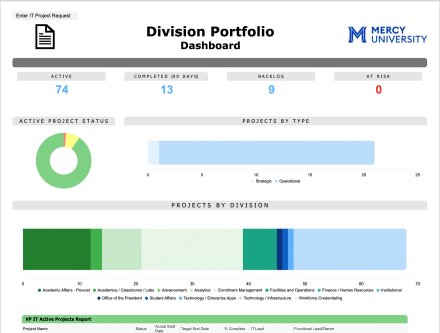
PMO dashboard screenshot

See where every project stands — in real time.

Portfolio Dashboard

Get a clear, real-time view of every active project in one place. The portfolio dashboard brings together status, timelines, budgets, and key metrics into a single, easy-to-scan interface—helping teams and leaders quickly understand progress, identify risks, and make informed decisions.

Why It Matters

Technology projects touch every part of Mercy. The PMO exists to make sure those projects actually get delivered — on time, on scope, and with the whole institution informed along the way.

  • More visibility — always know the status of your projects
  • Less risk — issues surfaced early, before they become problems
  • Better results — lessons from every project make the next one stronger

How to Get Started

Departments can submit project requests through our intake form, and are encouraged to join the Community of Practice to share ideas and scale successful strategies across the institution.

Submit a Project Request

Contact the PMO


Contact Us

Contact: pmo@mercy.edu